Google is testing a redesigned YouTube experience for Quest, with Horizon OS controls, a separate browsing window and resizable playback.
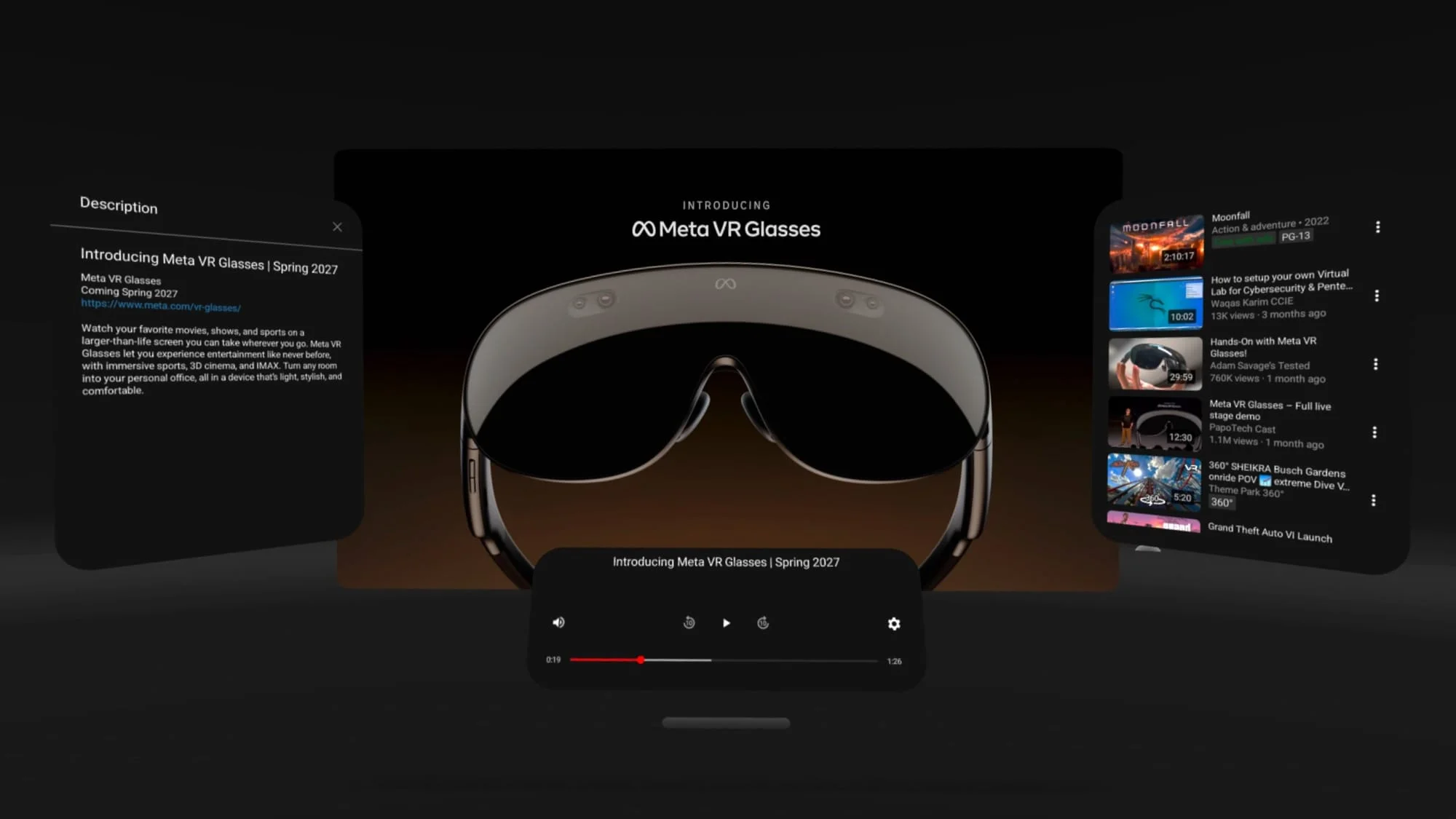
YouTube’s Quest app appears set for its biggest interface change in years. A redesign found in recent app updates brings its immersive view closer to modern spatial apps, with a second window for browsing while a video plays and controls shaped for Meta’s Horizon OS. The change addresses a basic tension in headset viewing: people want a large, focused screen, but they also need a practical way to find the next video or manage the app without abandoning playback.
A long overdue update for Quest
The app’s core design has changed little since its Oculus Go debut in 2018. That’s a long stretch for an interface used across several generations of headsets, even as YouTube added higher video resolutions, mixed reality wall anchoring on Quest 3 and 3S, and Panel Mode for opening YouTube in a conventional 2D window alongside other apps. Those additions extended what the app could do, but they didn’t substantially refresh its full-space experience.
Panel Mode already has an interface resembling YouTube on smart TVs, where browsing and playback follow familiar patterns. The full-space view, by contrast, remained largely untouched. Google now appears to be bringing those experiences closer together: the new main window draws on the Panel Mode design, while a Horizon OS-style control bar offers ways to switch environments or open Panel Mode. That could make the app easier to understand for people moving between ordinary windows and immersive viewing.
The distinction matters because a headset interface has to serve more than one kind of use. A flat panel can sit beside other apps, while a full-space view puts the video at the center of the experience. Until now, YouTube’s two modes have felt like separate generations of the same app.
Playback and browsing can run side by side
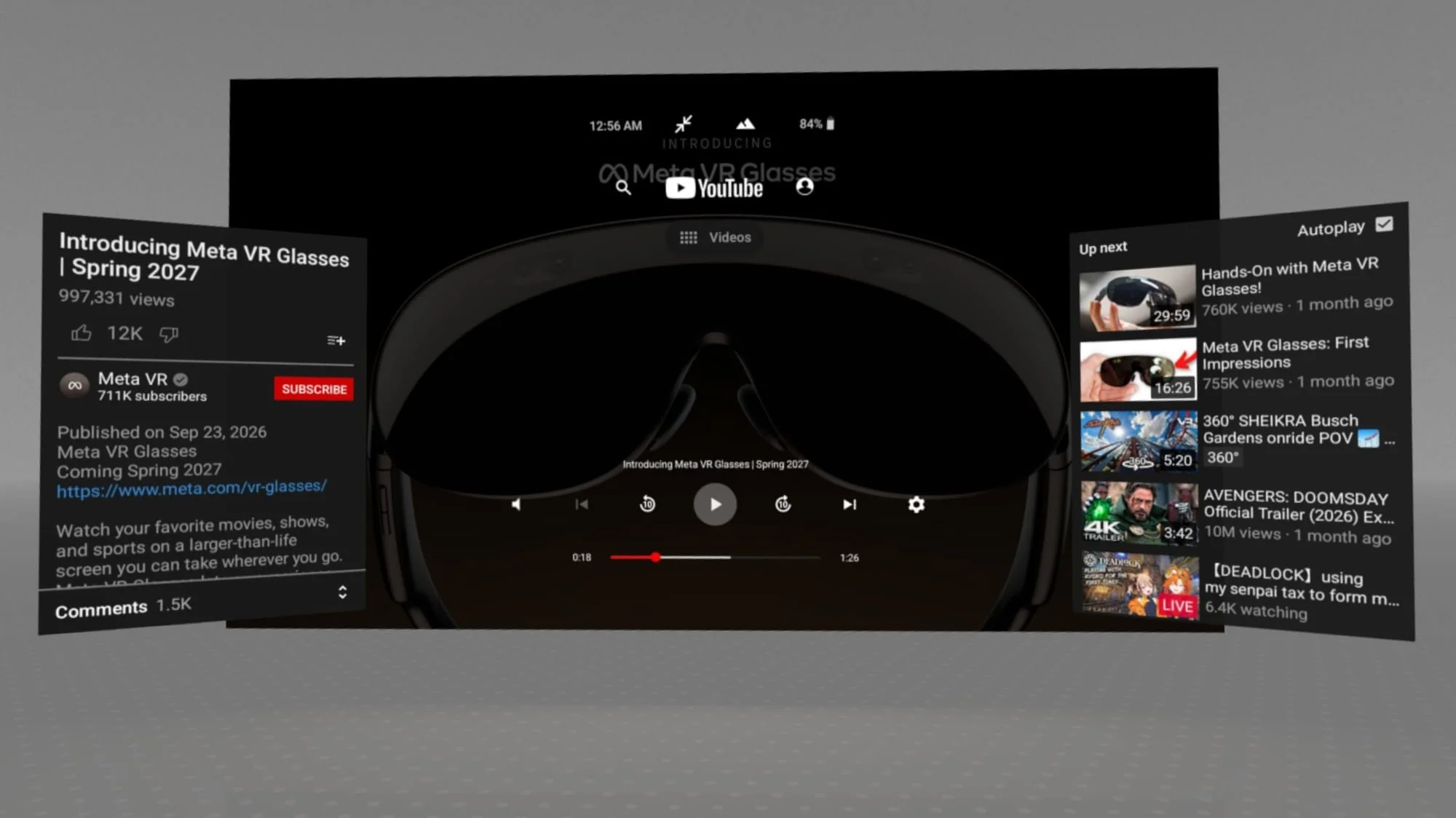
The clearest practical change is a separate window for finding videos. A selected clip then opens in the main playback window, letting users browse without leaving what they’re watching. That arrangement removes a small but familiar interruption: in a single-window design, returning to search or recommendations can mean covering or replacing the video. With two windows, the app can keep playback visible while the user decides what to watch next.
The main window also supports grab and corner resize handles, like other Horizon OS windows, and adjusts its dimensions to fit the video’s aspect ratio. That gives viewers some control over how the screen sits in their space, rather than forcing every clip into a fixed shape. The benefit is practical more than dramatic. Still, it’s the sort of detail that can make an app feel designed for a headset instead of merely displayed inside one.
The redesign also uses Meta-specific features, including the operating system’s virtual keyboard overlay. That means the search and text-entry experience can draw on an interaction pattern already used elsewhere in Quest. These details make the app feel more at home on the headset, rather than like an older VR interface carried forward onto newer hardware.
This is more significant than it looks. Browsing is part of watching, especially in a service built around recommendations and a large catalog; if those actions feel awkward, the immersive screen alone won’t make the app feel modern. (And this is the part most people overlook.) The everyday work of finding a video can shape the experience as much as the video window itself.
Similarities to other XR versions
The design echoes YouTube on Android XR and visionOS: a familiar browsing interface gives way to a spatial playback view. That shared pattern suggests Google is working from a broader idea of how YouTube should behave in headsets: let people browse in an interface they recognize, then give playback more room when they choose to watch. The broad resemblance doesn’t establish that the versions have identical features.
The Android XR and visionOS versions add controls for adjusting the viewing area with 360-degree and 180-degree 3D video. The Quest build shown so far doesn’t include those controls, so its immersive video feature set remains unclear. That gap matters because spatial video depends on more than putting a clip in a large window; viewers also need controls suited to the format. For now, the available material supports a comparison of interface direction, not a claim that the Quest app has caught up feature for feature.
If you're working in this space, the useful question is whether the interface makes distinct headset capabilities easy to reach. A shared visual approach can help users move between devices, but each platform still has to handle its own controls and viewing modes. Here’s the thing: familiarity is a starting point, not proof that the experience is complete.
YouTube on Android XR.
What the redesign signals for Quest
References to the redesign appeared in the Quest app in late August. Its timing aligns with Meta’s work on spatial app tools and its push for developers and partners to adapt apps ahead of Meta VR Glasses. That context gives the interface refresh a wider significance: Meta is building expectations around apps that can work across spatial devices, and familiar services have a role in making those devices useful beyond a narrow set of purpose-built experiences.
The direction suggests Google is treating Quest as part of a broader XR product family. A consistent approach to browsing and playback could help people recognize the app across devices, while Horizon OS-specific controls keep the Quest version grounded in its host platform. That’s a sensible balance, though the in-development interface still lacks some of the spatial video controls available elsewhere.
What this means for you depends on how you use YouTube in a headset. If you mostly want a large screen, the new layout appears to make playback easier to position and resize; if you watch spatial video, the missing controls leave an open question. The interface is still in development, so its final feature set and availability aren’t established by the material shown here.
A more current window can’t settle every question about immersive video, but it can make the everyday parts of YouTube feel less dated. A useful step. A finished story, not yet.
 Luna


Discussion
Sign in to join the discussion.